The dashboard is only the beginning
The first version of Localhost Watchdog could tell me what was running on my computer. It could not touch anything.
That boundary was intentional. A local server is not just a port. On Windows, the process listening on that port may be a child of a shell wrapper, the PID may have been reused, and the project I think I am looking at may no longer be the project actually serving the request.
A Stop button built on incomplete identity is just a faster way to stop the wrong thing.
This update moves Watchdog from inspection into guarded management. It can now stop a verified managed server gracefully, start explicitly registered projects, restart them, adopt compatible detected servers, and expose the same controls through a small Windows tray companion.
The interesting part is not that it can send a signal. It is the amount of evidence it requires before doing so.
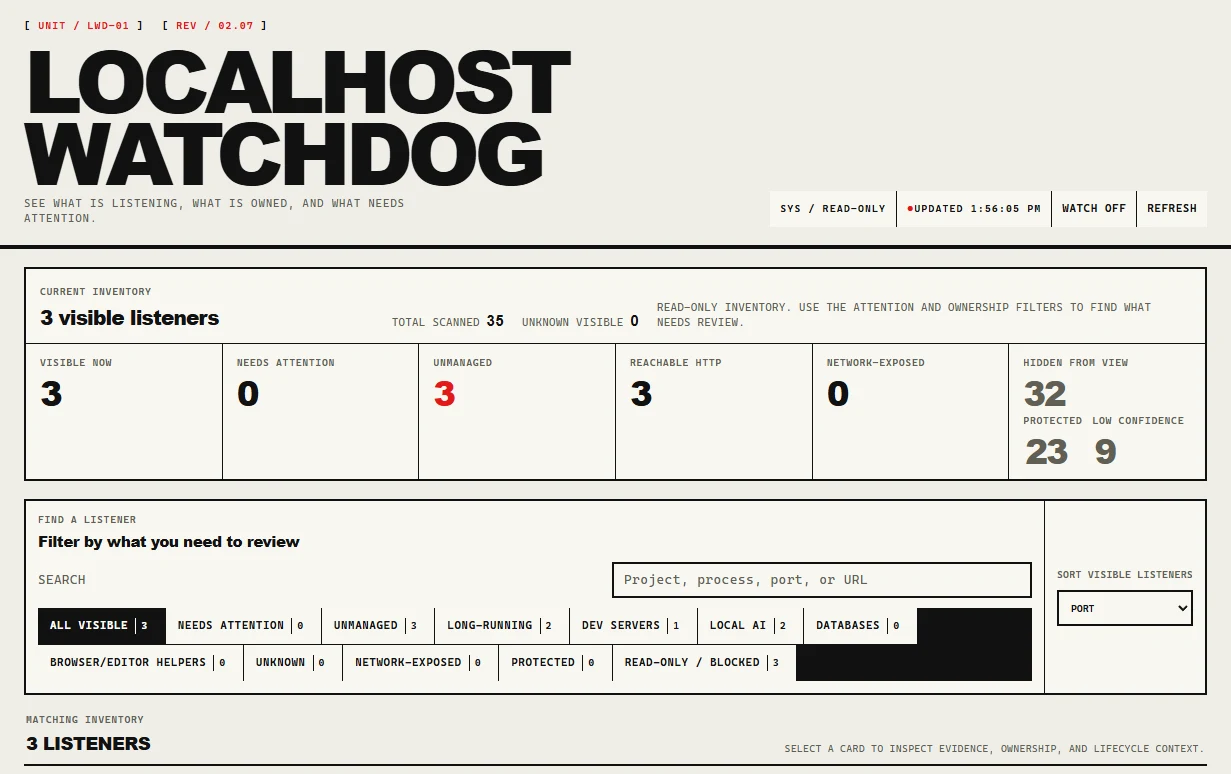
This is still the first layer of the product: find what is listening, decide what is safe to show, and make the boundaries visible.
The selected listener view goes further than a list of ports. It can show the project root, URL, final URL, process chain, launcher context, reachability, running duration, and repeated scan history for a server such as demo-website on port 5173.
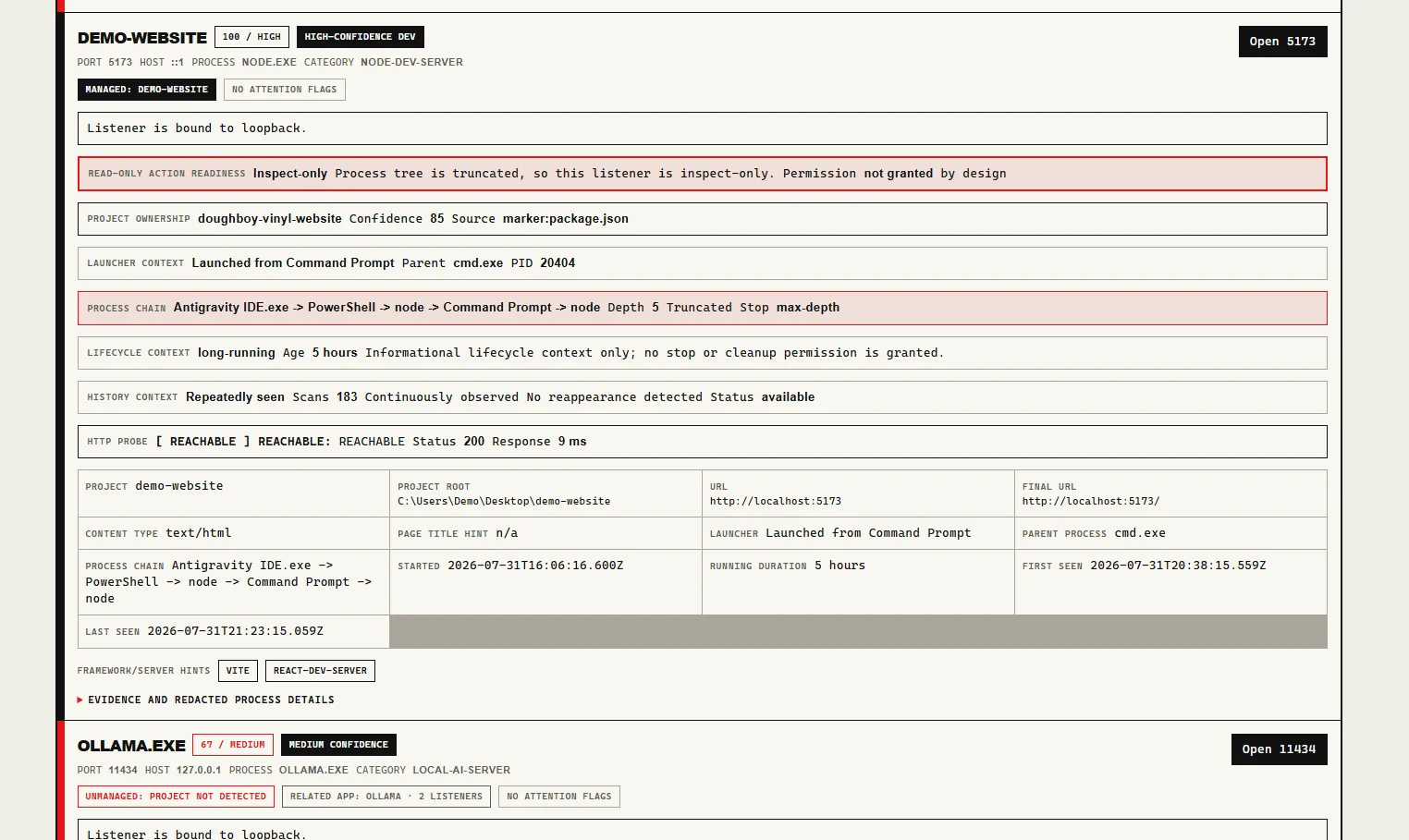
That detail matters because the management layer cannot safely operate on “whatever is using port 5173.” It needs a particular process instance, the listener it owns, the project connected to it, and enough confidence that those things still match.
The report can also mark a listener as inspect-only when the process tree is truncated: permission not granted by design. That is not a missing button. It is Watchdog refusing to infer what it cannot prove.
The important change happens after this screen.
A real stop is a chain of refusals
The previous implementation already had the safety checks for a stop action:
- Scan the current listeners.
- Identify the exact process instance.
- Run a dry run.
- Recheck the PID, creation time, listener, port, project, confidence, and protected boundaries.
- Ask for explicit confirmation.
- Record the request without touching the process.
That last boundary has now moved. After confirmation, Watchdog issues a short-lived execution proof and performs another fresh revalidation immediately before acting.
If the PID was reused, the listener changed owners, the port changed, the project identity drifted, or required security metadata is unavailable, the action is blocked.
When the checks pass, the Windows graceful-stop backend targets that one verified process. It can request CloseMainWindow for compatible GUI processes or send a targeted CTRL+BREAK signal to supported development runtimes running inside a verified Windows console process group.
There is still no force kill.
No taskkill. No generic process-tree termination. No automatic escalation because the first graceful request took too long.
That means a stubborn server remains a problem to solve. I am fine with that for now. A tool that refuses an uncertain action is more useful than one that is very efficient at guessing.
Starting and restarting require ownership
Stopping a detected server is only one side of management. If Watchdog is going to restart something later, it needs to know how that project was started in the first place.
Managed projects now have a structured launch contract containing the canonical project root, display path, runtime executable, launch arguments, working directory, environment values, preferred port, fallback strategy, and runtime metadata.
This is not an arbitrary command runner. The launcher validates the configuration, checks the working directory, selects an allowed port, starts a supported direct runtime in its own Windows console process group, and returns a stable identity containing both the PID and the process creation time.
Direct Node and Python runtimes are supported first. Shell wrappers such as npm.cmd, pnpm.cmd, and yarn.cmd still fail closed because the wrapper process and the process that eventually owns the listener are not always the same thing.
That is inconvenient. It is also real.
Restart is therefore not implemented as “stop, wait a second, and run the command again.” The managed flow has to:
- resolve the registered project
- identify the current managed process
- revalidate the listener and port ownership
- stop it gracefully
- wait for the old identity to disappear and the port to become free
- launch the project again
- verify that the replacement process owns the expected listener
Each boundary matters. A restart that stops successfully but never launches is different from one that launches but binds to another port. Watchdog records where the transition stopped instead of collapsing every failure into “restart failed.”
The result is also recorded in privacy-safe restart history so a later review can distinguish a clean replacement from a half-completed transition.
That makes the result understandable when the machine is left in a partial state, which is usually when you need the explanation most.
Adoption is not the same as discovery
Watchdog can now turn some manually started servers into managed projects, but adoption begins with a draft.
The tool extracts what it can safely determine about the detected server: project root, runtime, executable, arguments, working directory, port, and launch compatibility. The draft can be reviewed before it becomes configuration.
Adoption is restricted to high-confidence loopback Node and Python processes that can be converted into the same direct-runtime contract used by managed projects.
Unknown listeners, protected processes, unsafe ports, duplicate projects, unsupported wrappers, and incomplete launch profiles are rejected.
This is an important distinction: a server can be visible without being manageable. Watchdog is not trying to adopt everything it can find. It is trying to avoid creating a project record that it cannot safely start or restart later.
The tray companion does not get a secret control plane
The original roadmap expected a Tauri wrapper eventually. The first tray implementation uses PowerShell, .NET, and System.Windows.Forms.NotifyIcon around the existing Node backend and browser dashboard.
The companion can start the Watchdog backend when it is not already running, open the dashboard, refresh local state, show visible and stale-candidate counts, display native Windows notifications, and quit.
It also tracks backend ownership. Shutting down the tray companion does not stop development servers, and it only shuts down the Watchdog backend that the companion started itself.
Managed project actions still go through the same protected local API, session and CSRF checks, confirmation flow, revalidation, and audit boundaries as the dashboard. The tray is another way to reach the control surface, not a bypass around it.
The automated tray service and host-control tests are complete. I am not calling the tray experience release-ready yet. It still needs manual testing in a real Windows desktop session for icon visibility, tooltip updates, notifications, browser opening, restart behavior, and failure states.
The part that is still awkward
Most normal frontend projects are not started with a direct call to node.
They are started with commands such as:
npm run dev
pnpm dev
yarn dev
Those commands introduce a wrapper between Watchdog and the runtime that eventually owns the port. Supporting them safely means keeping track of the wrapper PID, child runtime PID, actual listener owner, console process group, and whatever happens when hot reload replaces the child underneath everything.
Watchdog should not pretend that starting npm.cmd means it automatically knows which descendant is safe to manage. That compatibility problem is now one of the clearest next pieces of work.
The other next step is acceptance testing against ordinary projects rather than only controlled fixtures:
- a direct Node server
- a Python HTTP server
- Vite, Next.js, and Astro
- a project launched from VS Code
- a project launched from Windows Terminal
- a server that ignores graceful shutdown
- a port whose ownership changes during an action
The tray needs its manual pass. The project configuration needs a better setup and repair experience. Packaging needs to make starting Watchdog less annoying than managing the servers it was built to watch.
The shift
The first update was about building a reliable view of the local machine. This one is about giving that view a carefully limited ability to act.
Localhost Watchdog can now answer more than “what is listening?” It can identify a managed project, start it through a known contract, stop a verified process, restart it, and explain where the lifecycle broke if the transition does not complete.
That is enough to call it a management layer.
It is not enough to call the problem solved.
The next test is whether the same safety model survives the way people actually run projects: package scripts, wrapper processes, hot reload, stale terminals, and ports changing ownership at the worst possible moment.
At least now the next failure will be a real lifecycle failure, not a missing Stop button.